

Day 2 - Basics Of Linux and Some Commands

🚀 Welcome to the world of DevOps with Aakash! 🌐
Hey tech enthusiasts! 👋 I'm Aakash, a dedicated freelance Linux System Admin @xFusionCorp, and I'm on a mission to conquer the world of DevOps. Currently, I'm immersed in building exciting projects and sharing my learning experiences with you all.
🛠️ My Tech Arsenal:
- Docker
- Linux
- Kubernetes
- Jenkins
- AWS
- Python
- Java
- Prometheus
- Grafana
- Ansible
- Terraform
Join me in navigating the intricate realms of AWS DevOps technology. Let's embrace learning with gratitude and thrive in this ever-evolving landscape!
🤝 Connect with me for:
- Friendly chats
- Shared experiences
- Learning moments
Follow my journey on Twitter and Linkedin for daily insights and tech goodness. Let's build, automate, and innovate our way through the exciting world of DevOps! 🚀 #DevOps #AWS #TechEnthusiast #InnovationJourney #90DaysOfDevOps
What is Linux?
Linux is a Unix-based open-source Operating System developed by Linus Torvalds in September 1991. There are a tons of operating systems that use Linux as their base. Technically they are called "Linux Distributions" or "Flavors" . Some of the widely used Linux Flavors are Debian, Ubuntu, Kali Linux to name a few.
Let's Understand It's Architecture to the very basics:
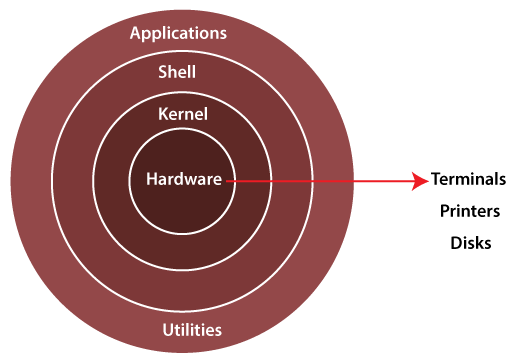
Linux Architecture Diagram
Kernel:
The kernel is the core component of an operating system. This provides a platform for programs and various services to run on top of it. The Linux Kernel is written in C Language and it talks directly with the hardware. All the commands that run on a Linux system are written in C and stored in the kernel.
Shell:
It is a special user program that provides an interface for the user to interact with the operating system. Shell accepts human-readable commands from users and converts them into something which the kernel can understand. It is a command language interpreter that executes commands read from input devices such as keyboards or from files.
Enough of the basic theory, Now let's heads up to some basic Commands
Linux Basic Commands:
Some Basic Commands:
To list all the files in a directory(folder) :
lsTo Make a Directory:
mkdir <file_name>To make a file:
touch <file_name>To make a directory and a file inside of it in one command:
mkdir -p <directory_name>/<file_name> : -p flag stands for parent i.e. first parent i.e. directory will be created and then the child i.e file .To check the user:
whoamiTo check the path of present directory i.e. Directory you are currently in:
pwdTo print on screen:
echoTo read the contents of a file:
cat <file_name>To seek help for a command:
[command] --help This will tell you about the details of the command.List all files in a directory including hidden ones:
ls -a the -a flag is used to display all files including the hidden ones.
Understanding a command:
Understanding a command is the most crucial part when starting with Linux. It looks complex but is straight and easy. Lets Understand it using a few examples:
Copy : cp
Change Directory : cd
List : ls
Make Directory: mkdir
In these examples we can see few bold letters, this pattern is carried on throughout Linux commands be it basics or even advanced.
Summary
Linux is an open-source operating system with distributions like Debian and Ubuntu. Its architecture includes a kernel (core component) and a shell (user interface). Basic commands include "ls" (list files), "mkdir" (make directory), and "touch" (make file). Other commands like "whoami," "pwd," and "echo" perform user-related tasks. Using "--help" with a command provides details. Commands follow consistent patterns, like "cp" for copy and "cd" for change directory.
Hope you find this insightful. Ending this with a beautiful quote by the creator of Linux, Linus Torvalds himself-
The Linux philosophy is 'Laugh in the face of danger'. Oops. Wrong One. 'Do it yourself'. Yes, that's it.
Happy Learning.


